Staff Pagers vs Guest Pagers: Two Different Jobs
One tells a guest their table is ready. The other tells a server that three plates are dying under the heat lamp. Same technology, opposite design requirements.
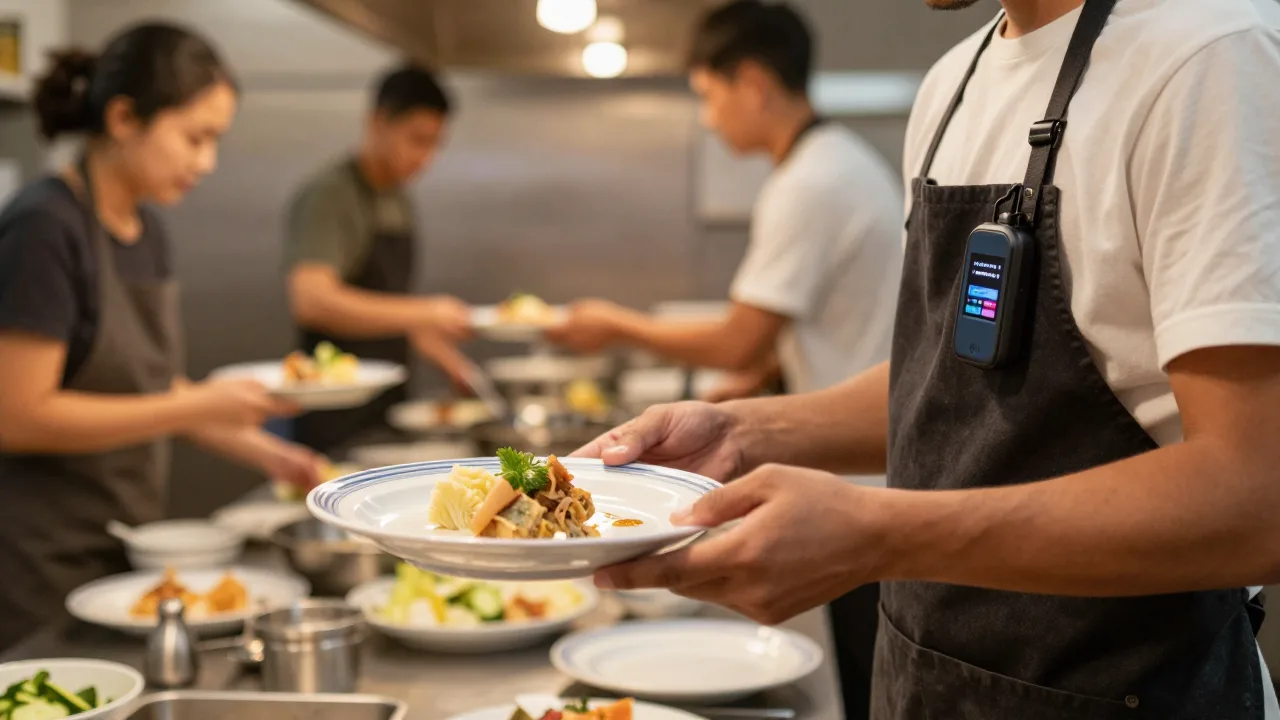
Stand at the pass of a busy restaurant at 7:40 on a Friday and you will watch the same failure repeat every few minutes. Three plates go up. The expo calls a name. Nobody comes. The expo calls it again, louder. Forty seconds pass. A minute. The pasta is still fine; the fries are not. By the time the server arrives from table 22 on the other side of the room, the plate that left the kitchen perfect is arriving at the table merely acceptable.
That gap is a paging problem — but it is a completely different paging problem from the one at your host stand, and this is where a lot of restaurants make an expensive mistake. Having already bought a guest paging system, an operator looks at the box of coasters and thinks: I'll just give a few of these to the servers.
It does not work. Not because the radio is wrong, but because everything wrapped around the radio is designed for the opposite job. A guest pager is built to be noticed by someone standing in a noisy lobby who will hold it for twenty minutes and give it back. A staff pager is built to be felt by someone wearing it for eight hours who needs to know which station is calling without breaking eye contact with a table. Optimize for one and you actively degrade the other.
Here is a full breakdown of the two jobs, the hardware differences that follow from them, and how to decide what your restaurant actually needs.
Job One: Notify a Guest Who Is Waiting
The guest pager has a narrow, well-defined mission. Somebody who does not work for you, who has never used your equipment before, who may be outside in a parking lot or two doors down at a bar, needs to reliably notice a single event: your table is ready.
That mission dictates the design:
- Impossible to miss. Bright flashing LEDs, an audible tone, and a strong vibration all firing at once. Redundant alerts, because the guest may be in a loud bar or a quiet car.
- Zero learning curve. No buttons that matter, no screen to read, no instructions beyond "when it lights up, come see me."
- Physically obvious. A large coaster shape that will not vanish into a pocket and reads visually as restaurant property.
- Cheap enough to lose. At $40 to $70 apiece, a fleet of 30 is a manageable asset, which matters because guest pagers walk off. Loss is a chronic line item, and one worth managing deliberately.
- Handled by strangers. Waterproof-ish, drop-tolerant, sanitizable between guests, with no exposed ports to abuse.
Notice that discretion is not a requirement. A guest pager that is subtle is a broken guest pager. If anything, the design trend has moved toward more conspicuous alerts — which is the core distinction explored in our comparison of coaster pagers versus LED pagers.
Job Two: Signal a Staff Member Mid-Shift
The staff pager has an entirely different user: a trained employee, wearing the device for a full shift, working in front of guests, who needs information rather than just an alert.
The design requirements invert almost point for point:
- Silent and discreet. Vibration only, or a very quiet tone. A device that beeps loudly while a server is taking a table's order is a service defect, not a feature.
- Wearable for eight hours. Small, light, clippable to an apron or belt, or worn on the wrist. A coaster in an apron pocket gets set down at a station within twenty minutes and stays there.
- Carries information. The most valuable staff pagers display a source: station 2, table 14, bar, expo. "Something needs you" is far less useful than "the pass needs you."
- Built for eight hours a day, five days a week. Guest pagers get maybe two hours of handling per day. Staff pagers get bumped, sweated on, and dropped constantly. Build quality has to be higher.
- Small fleet, longer life. Four to twelve units rather than thirty to sixty, at $60 to $130 each, but they last much longer because the public never touches them.
The economic picture surprises people: total spend on the two systems often lands in a similar range, because the staff fleet is small and the guest fleet is large. What differs is the replacement cadence. Guest pagers are a consumable. Staff pagers are equipment.
Side-by-Side: The Differences That Matter
| Dimension | Guest Pager | Staff Pager |
|---|---|---|
| Form factor | Coaster or puck, 3–4 inches | Wearable clip, wrist unit, or slim pocket device |
| Alert style | Flash + tone + vibrate, maximum salience | Vibrate, optional quiet tone |
| Information carried | None — just "come to the host stand" | Source, station, table, or short message |
| Direction | Usually one-way receive | Often two-way with acknowledgment |
| Typical fleet size | 20–60 units | 4–12 units |
| Unit cost | $40–$70 | $60–$130 |
| Service life | 1–3 years, loss-driven | 3–5 years, wear-driven |
| Who handles it | The public | Trained staff only |
| Charging pattern | Between every guest, in a rack | Overnight, one dock per unit |
The row worth pausing on is direction. Guest paging is broadcast-and-hope: the base station sends, the coaster receives, and nobody at the host stand knows whether the guest noticed. Staff paging increasingly runs both ways, so the expo sees an acknowledgment and knows the runner is coming. That acknowledgment loop is the single largest functional upgrade in staff paging, and we cover its mechanics in detail in our look at two-way paging system benefits.
Why Servers Abandon the Wrong Device
Here is the practical failure mode when a restaurant tries to use guest coasters for staff. Within two shifts, every coaster ends up sitting on a server station instead of on a person. The reasons are always the same and always predictable:
- Size. A four-inch disc does not live comfortably in an apron with a book, pens, a wine key, and a phone.
- Noise. It chirps at the table. Servers silence it or leave it behind rather than interrupt a guest interaction.
- Ambiguity. It buzzes, but there is no indication whether the pass needs a runner, the bar has drinks up, or a manager wants them. The server has to physically go look, which is exactly the walk you were trying to eliminate.
- Ownership. Anything that goes back into a shared rack at close feels like nobody's. Assigned devices get cared for; pooled ones get dropped.
The result is a system that gets bought, ignored within a week, and cited two years later as evidence that "paging doesn't work here." The technology was never the problem.
When Each System Earns Its Keep
Not every restaurant needs both. Use this as a rough filter.
| Situation | Guest Pagers | Staff Pagers |
|---|---|---|
| Regular waits over 10 minutes | Yes — core use case | Not related |
| Guests wait outside, on a patio, or in cars | Yes — range is the whole point | Not related |
| Large floor plan, servers far from the pass | Not related | Yes — highest payoff |
| Expo shouts names across the kitchen | Not related | Yes |
| Multi-level or indoor/outdoor seating | Yes | Yes |
| Counter-service, guests stand at the counter | Marginal | Marginal |
| Fine dining with heavy table-side service | Often no — reservations dominate | Yes — silent alerts fit the room |
Fine dining is the interesting case. Those rooms rarely want a lobby full of buzzing coasters, but they are among the strongest candidates for silent staff paging, because the whole service model depends on a server appearing at exactly the right moment without being summoned across a quiet dining room. Discretion is the product.
The Back-of-House Payoff Is Narrow but Real
Be honest about what staff paging does and does not fix. It compresses one specific interval: pass-to-pickup. In restaurants where that interval runs two to four minutes, closing it to under sixty seconds shows up immediately in food quality at the table and in how much the expo has to shout. It also removes a real source of friction between the kitchen and the floor, which is worth something that does not appear on any report.
What it does not fix: understaffing, bad ticket times, poor course sequencing, or a kitchen that fires everything at once. Those are kitchen workflow problems, and a vibrating clip on a server's apron will not touch them. Operators who buy staff pagers expecting a general speed improvement are usually disappointed; operators who buy them to fix a measured pass-to-pickup gap usually are not. If throughput is the broader goal, the levers live in how service is sequenced end to end, with paging as one small component.
Example scenario: a 145-seat tavern with a mezzanine and patio fixing pass-to-pickup time
Illustrative scenario — a composite example built to show how the numbers work. It does not describe a real business or customer.
Consider a tavern that seats 145 across a main room, a mezzanine, and a 40-seat patio, with the kitchen pass tucked behind the bar. The expo calls tickets by name into a room he cannot see, and food sits an average of 2 minutes 50 seconds between plating and pickup, with a long tail past five minutes on patio tables. Suppose the general manager first tries handing spare guest coasters to servers; within four shifts all six are living on a server station and nobody is carrying them. They are replaced with eight wearable clip pagers, one assigned to each server on the floor, with two-way acknowledgment at the pass. Median pass-to-pickup drops to 48 seconds within three weeks. Patio food complaints — overwhelmingly about temperature — fall from an average of nine a month to two. The expo stops shouting entirely, which front-of-house staff would likely rate as the single most noticeable change. Total hardware cost in this example is roughly $780, recovered in comps and remakes inside four months.
Common Mistakes
| Mistake | Why It Hurts | The Fix |
|---|---|---|
| Using guest coasters as staff pagers | Too big, too loud, carries no information — gets abandoned | Buy wearable staff units assigned by name |
| Buying staff pagers without measuring the gap | Solves a problem you may not have | Time pass-to-pickup for one full service first |
| Pooling staff pagers in a shared rack | Unassigned devices get neglected and lost | Assign one unit per server, logged at shift start |
| Assuming one base station runs both | Cross-brand encoding is proprietary | Confirm module compatibility in writing |
| Skipping training on the staff side | Unclear alert meanings lead to ignored buzzes | Define what each alert pattern means, in writing |
| Expecting paging to fix ticket times | Wrong tool for a kitchen sequencing problem | Fix the line first, then close the pickup gap |
That fifth row deserves emphasis. Staff paging fails far more often from unclear protocol than from bad hardware. If a server cannot tell a "food up" buzz from a "manager needs you" buzz, both get ignored inside a week. Our pager system staff training guide covers how to build the alert vocabulary and drill it in pre-shift.
Where the Two Systems Are Converging
The clean split described above is starting to blur, for one reason: staff already carry a device. When servers have handhelds or the restaurant runs a floor app, the "staff pager" becomes a notification inside software rather than a separate clip — and it can carry far more context than any dedicated pager ever could. Table 14 needs a check-back, three plates are up for section 2, the bar has two cocktails waiting.
The guest side is converging too, with SMS and app-based notification handling some of the load that coasters used to carry, as covered in our overview of guest paging apps. But the guest hardware has proven far stickier than predicted, because a coaster works for guests with no signal, no data, no app, and no interest in giving you their phone number.
The likely end state is not one system replacing the other. It is both channels running from the same floor-management layer, so the host stand and the pass share one picture of the room instead of operating two disconnected radios.
One Floor, One System
KwickOS runs guest notifications and staff alerts from the same view of your dining room — so the host stand knows what the pass knows, every alert is logged, and nobody is shouting names across a full kitchen.
See how KwickOS connects front and back of house →